Visual Collaboration Tools Overview
Discover how Atarim’s visual collaboration tools simplify feedback and accelerate project workflows.
 Visual Collaboration

Atarim’s visual collaboration tools empower teams and clients to provide feedback directly on live websites and designs. These tools eliminate the need for lengthy email threads and reduce miscommunication by tying feedback to specific visual elements. In this article, we’ll explore the core features of Atarim’s visual collaboration tools and how they enhance project communication and management.
Step-by-Step Guide
1. Visual Commenting
Users can click directly on any element of a live website or design and leave a comment. This creates a visual task that’s easy for the entire team to understand and act upon.
Instructions:
- Open a project in Visual Collaboration View.
- Hover over the area you want to comment on.
- Click to place a comment marker.
- Type your comment and press Send.
- A task is automatically created and tracked.

Tip: Encourage stakeholders to use this feature to point directly at what they want changed—instead of writing long email descriptions.
2. Screenshots and Annotation
Each comment automatically generates a screenshot that captures the exact visual state. Users can also take manual screenshots, annotate them with shapes and text, and attach them to tasks.
Instructions:
- Create or open a task in Visual Collaboration.
- Use the annotate tool to add arrows, highlights, or notes.
- Save the annotation—it will attach to the task as a reference image.
- You can also upload additional files/screenshots as needed.
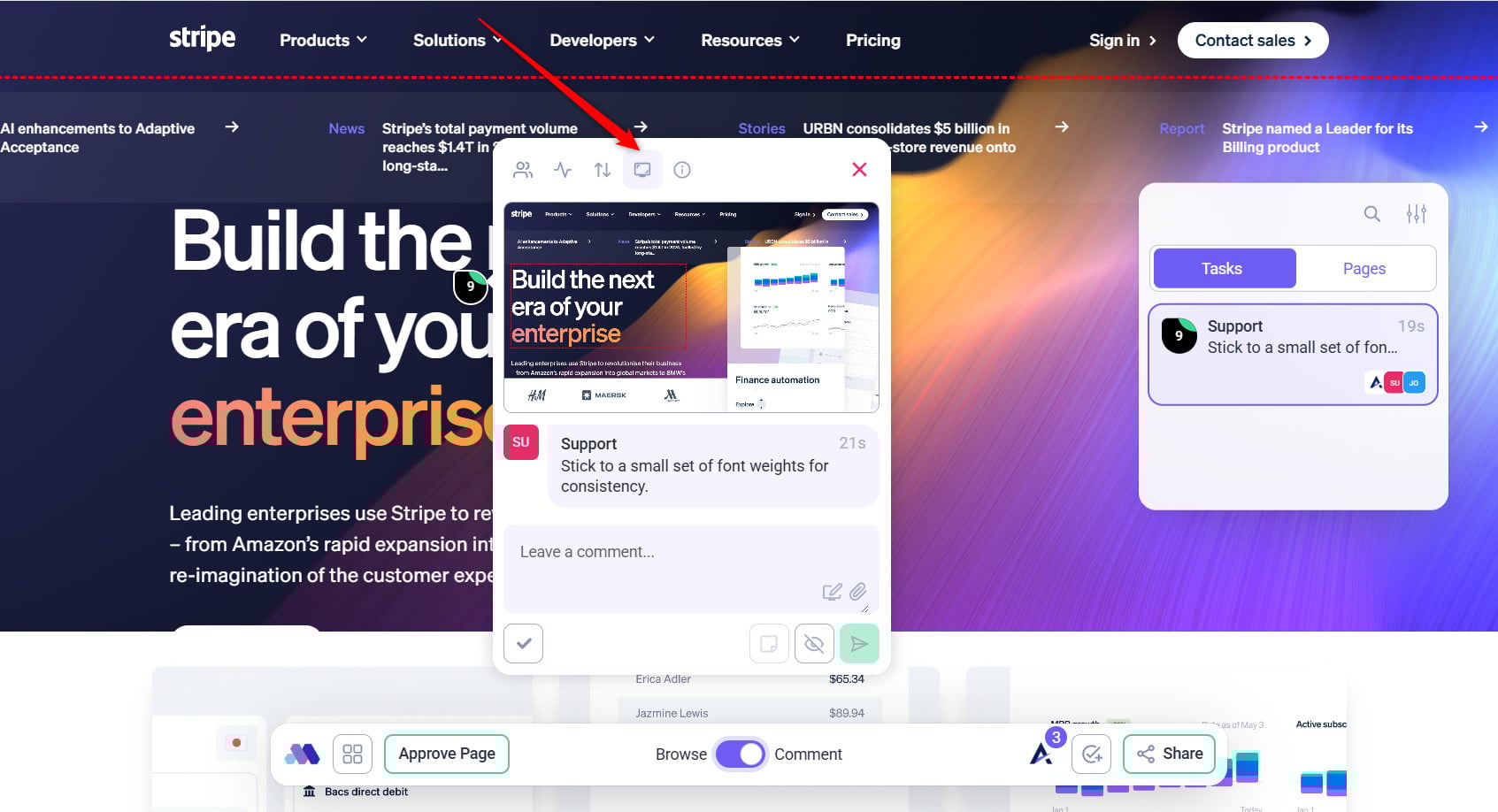

Learn More About How to Use the Annotation Tools for Feedback in Atarim
Tip: Use annotations when feedback requires step-by-step guidance or detailed visual context.
3. Task Management Integration
All visual comments instantly become tasks in Atarim’s task dashboard. Team members can track, assign, and prioritize them just like any other task.
Instructions:
- Navigate to the Inbox or Boards view.
- Locate tasks created through visual collaboration (identified by screenshots and URLs).
- Assign team members, set priority and status, and track progress.

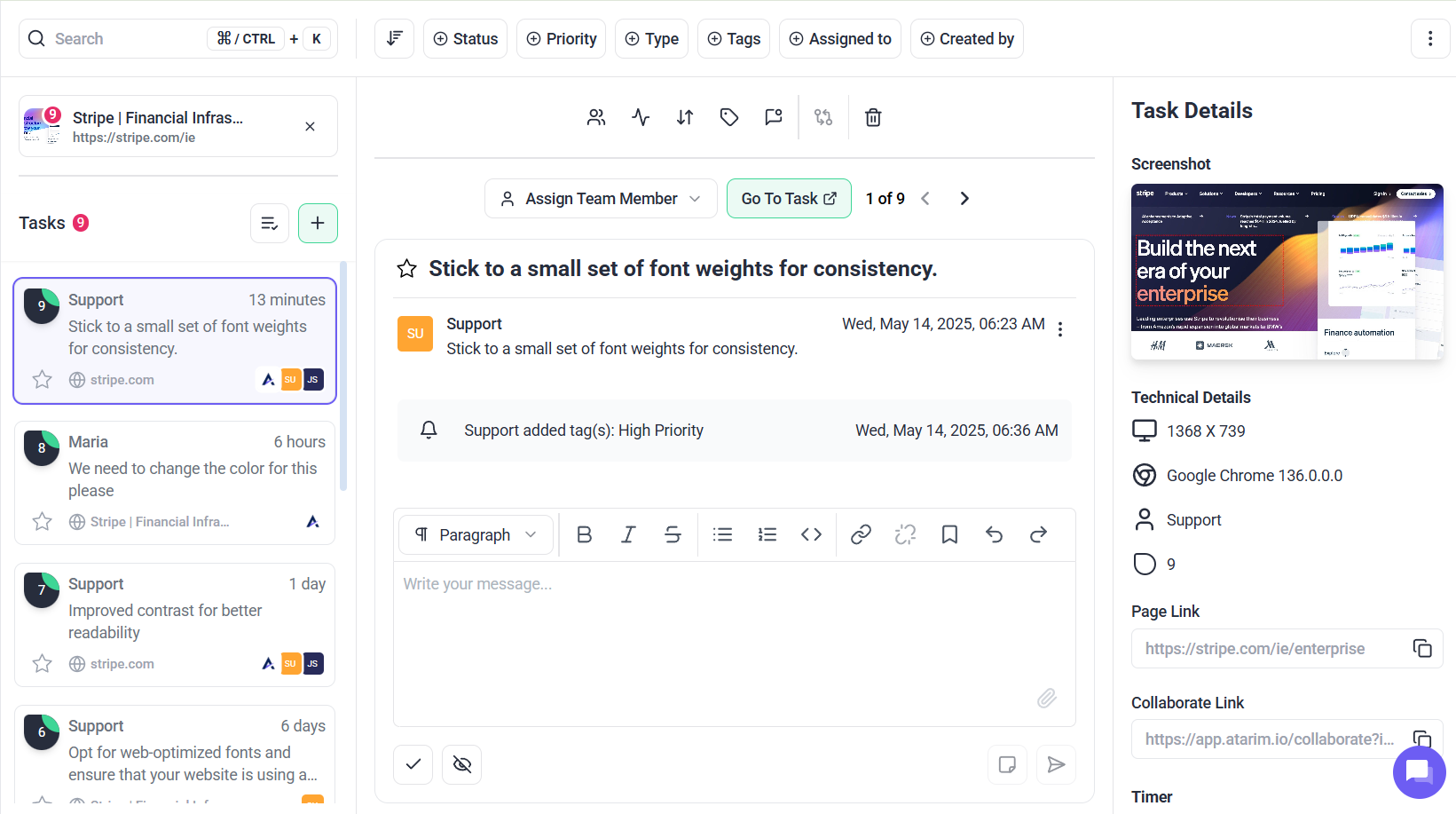
Recommendation: Regularly review visual tasks in the Inbox to ensure no feedback is left unaddressed.
Benefits of Using Visual Collaboration Tools
1. Streamlined Feedback Process
Faster review cycles by allowing users to leave feedback directly on what they see—no screen sharing or calls required.
2. Enhanced Communication
Non-technical stakeholders can point and click, removing ambiguity and reducing the need for long explanations.
3. Increased Accountability
Each comment is a task with clear assignees and deadlines, ensuring all feedback is captured and acted upon.
4. Faster Project Completion
By integrating feedback directly into your workflow, projects move from concept to completion significantly faster.
Use Cases for Visual Collaboration
Design Review and Feedback
Design teams use visual markers to gather precise client feedback on web designs, wireframes, and mockups.
Website Testing and QA
QA Engineers leave notes and bug reports directly on live pages—developers can see exactly where and what needs fixing.
Client Collaboration
Clients use visual tools to approve changes, suggest updates, and resolve questions—all without needing to navigate complex systems.
FAQs
Where can I find more resources to get started?
Visit Atarim’s Help Center for tutorials, and step-by-step guides to make the most of its features.
How do I start using Atarim’s visual collaboration tools?
Sign up for Atarim, access the project dashboard, and use the visual collaboration icon to start adding comments on live web pages or design assets.
Can clients use Atarim without training?
Yes, Atarim’s intuitive interface is designed for technical and non-technical users alike. The “Grandma Test” ensures simplicity and ease of use for all personas.
Is it possible to track changes made after feedback?
Absolutely. All tasks are saved and can be viewed within the platform. The task management dashboard helps you track the status of changes.
Does Atarim support integrations with other tools?
Yes, Atarim integrates with popular tools like Slack, Jira, Asana, and Trello. It also offers API access for custom workflows.
How does Atarim help improve project timelines?
By centralizing feedback and reducing communication loops, Atarim shortens feedback cycles, helping teams implement changes and complete projects faster.
Are there analytics or reporting features in Atarim?
Yes, Atarim provides activity tracking and insights into project progress, helping you monitor and optimize team performance.
Conclusion
Atarim’s visual collaboration tools make project communication more effective by enabling users to provide direct, actionable feedback on live websites and designs. By reducing the need for lengthy explanations and back-and-forth emails, these tools improve the overall efficiency of project management, ensuring that teams and clients can work together seamlessly.
Tips & best practices
- Maximize the Use of Visual Feedback: Encourage stakeholders to leave comments directly on specific webpage elements instead of describing issues via email. Use screenshots and annotations to clarify complex feedback, ensuring minimal miscommunication.
- Integrate Atarim with Your Project Management Tools: Link Atarim’s visual collaboration tools to your existing project management system (e.g., Trello, Asana) for seamless task tracking and follow-ups. Utilize Atarim’s API access for custom workflows tailored to your team’s needs.
- Monitor and Adjust Workflows: Regularly review the tasks and feedback in Atarim’s dashboard to ensure everything stays on track. Use analytics to identify bottlenecks and optimize team performance.